
Looking for web hosting in India and getting tired of tech terms and confusing plans? You’re not alone. Choosing the right hosting matters: it affects your website’s speed, reliability, and how customers see your brand. In this guide I’ll walk you through everything — the types of hosting, what to check before buying, a simple checklist to pick a host, real cost expectations for 2025, and easy speed tips you can use today. Whether you’re starting a personal blog, a small business site, or an online store, this guide will make the choice easy. Let’s begin.
Table of Contents
ToggleWhat is web hosting? The quick, simple answer
Web hosting is space on a server where your website files live so anyone can access your site on the internet. Think of the domain (yourwebsite.com) as your address, and hosting as the plot of land where your house sits. If the hosting is slow or unreliable, visitors will get a poor experience — slow pages, errors, and lost sales.
Domain vs hosting — what’s the difference?
- Domain = your web address.
- Hosting = server space that stores your website files.
You need both to run a website.
How hosting affects your website
Hosting determines page load speed, uptime (if your site stays online), and the quality of technical support you’ll receive when something breaks.
Types of web hosting explained (and who they’re for)
Shared hosting
Best for beginners and very small sites. Multiple websites share the same server resources. Cheap and easy, but limited performance.
WordPress hosting
Optimized specifically for WordPress sites. Faster defaults and helpful support if your site uses WordPress.
VPS hosting (Virtual Private Server)
a virtual slice of a server dedicated to you. More control and resources than shared hosting. Good for growing sites.
Dedicated severs
You get the entire server. High performance and control, used by big sites and apps with high traffic.
Cloud hosting
Scalable hosting that draws resources from multiple servers; great for websites that need sudden traffic spikes.
7 factors to judge web hosts in India (don’t miss these)
Speed and server location
Servers located in India or nearby improve load times for Indian visitors.
Uptime guarantee
Look for 99.9%+ SLA.
Customer support
24/7 chat and phone support in English (and local languages if needed).
Pricing & renewal rates
Promotional first-year prices are common; check renewal costs
Control panel
cPanel is common and beginner-friendly. Plesk is an alternative.
Security & backups
Daily backups, free SSL, malware scanning.
Scalability
Ability to upgrade easily to VPS/Cloud/Dedicated without long migrations.
Quick comparison: Hosting types at a glance
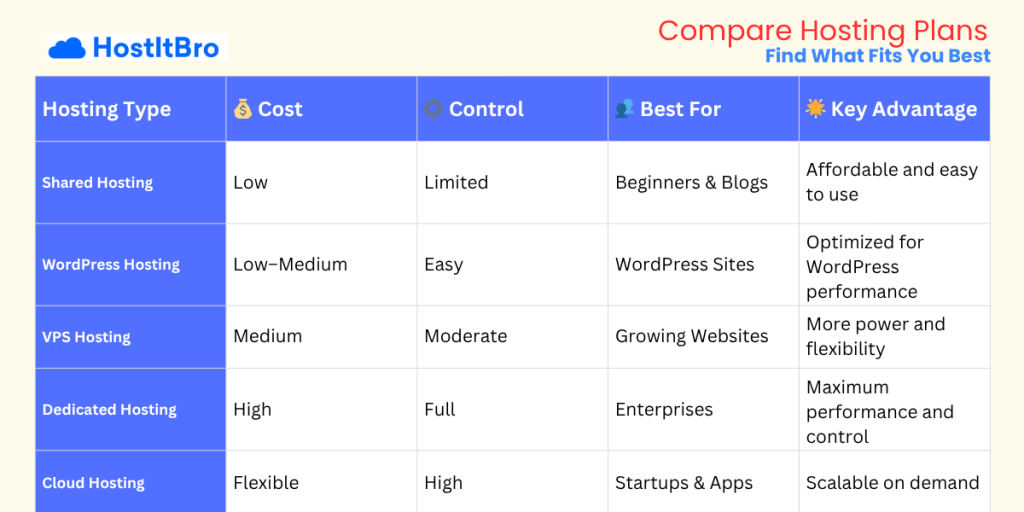
If you’re just getting started, Shared Hosting is the easiest and most affordable choice — perfect for blogs or small personal websites. It keeps costs low but comes with limited control and performance.
For those using WordPress, a WordPress Hosting plan is designed especially for that platform — it’s optimized for speed, automatic updates, and security, making it ideal for beginners or small business sites.
When your website starts growing, VPS Hosting gives you more power and flexibility. It costs a bit more, but you get better speed and control over your resources.
If you manage a large or high-traffic website, Dedicated Hosting provides full control and top performance because you get an entire server just for your site.
And finally, Cloud Hosting is the modern, scalable option. It adjusts resources automatically as your traffic increases, making it perfect for startups, e-commerce stores, and applications that can grow fast.
In short, choose Shared or WordPress hosting to start, VPS as you grow, and Dedicated or Cloud hosting when performance and scalability become your top priorities.
Top Use-Cases — Which Hosting Do You Need?
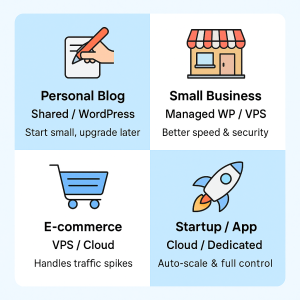
Choosing the right hosting becomes easier when you match it with your actual goal. Whether you’re starting a blog, running a small shop, or building an online brand — the right hosting plan saves money, improves speed, and keeps your website stress-free.
Let’s break it down simply 👇
Personal Blog or Portfolio
If you’re just starting your first website — maybe a personal blog, photography portfolio, or resume page — Shared Hosting or WordPress Hosting is all you need.
It’s budget-friendly, easy to manage, and doesn’t require technical skills. Most shared plans include one-click WordPress installation, so you can focus on writing or showcasing your work instead of handling servers.
💡 Value Tip: Start small with shared hosting and upgrade later when your traffic grows — it’s the smartest way to save money in the beginning.
Small Business or Local Shop
If you’re a small business owner, freelancer, or running a local service (like a salon, café, or repair shop), go for Managed WordPress Hosting or VPS Hosting.
These plans give your website faster speed, better security, and professional email options, which help you look more credible to customers.
💡 Value Tip: Managed WordPress hosting handles updates, backups, and performance for you — so you can focus on growing your business instead of maintaining your site.
E-commerce Store
Running an online store? Then you need reliability and speed — your website can’t go down during sales!
That’s why VPS Hosting or Cloud Hosting is ideal. These options give you dedicated resources, secure payment integration, and the power to handle traffic spikes during festive seasons or flash sales.
💡 Value Tip: Choose hosting that offers free SSL certificates and automatic backups — they’re essential for safe online transactions.
High-Traffic Apps or Startups
If you’re building a fast-growing startup, SaaS tool, or news/media website with heavy daily traffic, then Cloud Hosting or Dedicated Hosting is your best match.
These plans deliver high performance, scalability, and full control over your server. They can handle thousands of users simultaneously without crashing.
💡 Value Tip: Look for hosts that offer auto-scaling — it automatically adds resources during peak traffic and saves cost when traffic is low.
How to pick the best host in India — step-by-step checklist
Step 1 — Estimate traffic & resources needed. Check expected monthly visitors to choose shared vs VPS.
Step 2 — Compare speed & server locations. Prefer servers with Indian data centers or nearby.
Step 3 — Test support. Open a pre-sales chat — are replies fast & helpful?
Step 4 — Check renewal and hidden fees. Domain costs, migration fees, backup costs.
Step 5 — Use trial or money-back window. Move if the service doesn’t meet expectations.
How to migrate to a new host without downtime (simple plan)
Backup full website (files + database).
Set up new hosting and upload files.
Test the site on temporary URL.
Update DNS — set low TTL in advance.
Monitor during 24–48 hours after switching.
Cost breakdown — what to expect in India (2025)
Shared / WordPress (entry-level): ₹149–₹599 / month (promotional), renewals higher.
VPS (basic): ₹700–₹2,500 / month depending on RAM and CPU.
Dedicated: ₹3,000+ / month — varies significantly.
Watch for migration fees, backup add-ons, and premium support which can increase total cost.
Speed tips — make your hosting feel faster today
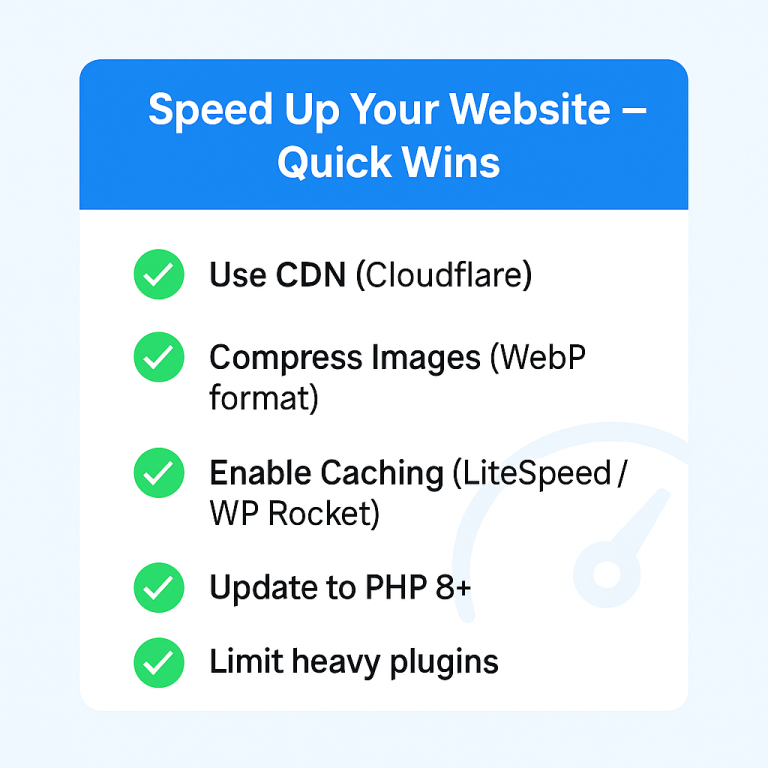
Use a CDN (Content Delivery Network) for static files.
Optimize images (WebP, compress).
Use caching plugin (for WordPress: WP Super Cache / LiteSpeed Cache).
Choose PHP 8.x and latest stack.
Limit heavy plugins and offload media where possible.
FAQs
For most small businesses, managed WordPress or an entry-level VPS is the best choice — both offer better speed, security, and professional features than basic shared plans.
Entry-level shared hosting often starts around ₹149–₹599/month (promotional). VPS and dedicated servers cost more — expect higher monthly rates depending on resources.
Yes. A server located in India or nearby reduces latency for Indian visitors and usually improves page load times.
Backup files & database → upload to new host → test on a temporary URL → set a low TTL → update DNS → monitor for 24–48 hours. and usually improves page load times.
Domain = your web address (example.com). Hosting = the server space where your website files live. You need both to run a website.
Yes. Daily backups and a valid SSL certificate are essential for security and user trust — especially for e-commerce.
If your site uses WordPress, pick WordPress hosting — it’s optimized for WP performance and usually includes automatic updates and caching.
Final Thoughts: Choosing the Best Web Hosting in India
Finding the right web hosting in India doesn’t have to be confusing. Once you understand your website’s purpose — whether it’s a personal blog, a growing business, or a full-fledged online store — choosing the right hosting plan becomes easy.
If you’re just starting out, go for Shared or WordPress Hosting. It’s affordable and helps you learn without stress. As your website traffic grows, move to a VPS or Cloud Hosting plan to get more control and power. And if you’re managing a big project or high-traffic application, Dedicated Hosting is worth every rupee for performance and stability.
The key is to pick a host that’s reliable, transparent with pricing, and offers real human support — because when your website is down, you need help fast, not auto-replies.
Our Recommendation
If you want hosting that’s fast, secure, and backed by real support in India — start with HostitBro.
It’s designed for Indian users, with servers that deliver local speed, easy setup, and plans that scale as your website grows.
👉 Explore HostitBro Hosting Plans — perfect for beginners, small businesses, and startups looking for smooth, affordable performance.